Swap hours of clicking in your PrestaShop back office for one conversation with Claude.
Write "rewrite the descriptions in Lanterns". Claude does it in your PrestaShop store, shows you every change before saving it and can undo it in one sentence.
English launch January 2027 · PrestaShop 8.1+ and 9 · 70+ tools · pay once · 7 days to get your money back
See what a fix looks like ↓ Evenings are yours. Changes can wait till morning.

description 31 of 40…
9 more to go
Illustrative scene.
This is what a fix looks like
Sora rattan lantern. Buy online in our store.
Hand-woven rattan lantern. Warm light for your patio or balcony.
- Yesterday: an evening in the back office.
- Today: one sentence and your "yes".
Before launch
We tested it ourselves
TellMyShop is new, so there are no customer reviews to show yet. Here is what we checked on test shops before sales open.
PrestaShop 8.1, 8.2 and 9
Install, update and uninstall on clean test shops. On PrestaShop 9 we tested the whole path of a change: preview, save, check in the shop and undo.
Black Friday set up and undone
On a category of 7 products: a 20% category discount, a sale price, a discount code, a campaign category and page, free shipping over 200. Every step came as a preview first. The discounted price showed on the product page. After undoing, prices, codes, categories, pages and the shipping threshold were back to how they were before.
Customer data hidden after install
In both plugins, after install Claude cannot see customers' names, emails, phone numbers or addresses. We checked this on orders and customer accounts.
Nothing is saved without your yes
The free Audit cannot save anything. In the full version a save without an approved preview is blocked, and prices and stock stay off until you turn them on.
Once sales open, you can check it on your own shop: the free Audit only reads and shows a plan of fixes. If you buy a licence and change your mind, we refund the full amount within 7 days. One email is enough.
Tests from October 2026, PrestaShop module 2.6.
What does your store run on?
TellMyShop for PrestaShop
A module for PrestaShop 8.1 and 9. Descriptions, SEO, categories, promotions and a tidy catalogue in one conversation with Claude.
See the PrestaShop version
Nothing changes until you've seen it
Claude can look around your store as much as it likes. Before it changes anything, you see the current version next to the new one.
Sofas category description
Sofas at the best prices. Happy shopping!
Two- and three-seater, sofa beds and corner sofas, delivered in 5 days.
 Claude has 12 new descriptions. Have a look before I save.
 Saved. I'm keeping the old versions.
 Undone. Your store is back to yesterday.
You see the change first.
Before every change, Claude shows what will change, tells you the risk and how to undo it, and asks for your OK. For prices and promotions you get a short risk card.
Most changes undo in one sentence.
"Undo yesterday's changes to Sofas" puts everything back, even 40 products at once.
It works like one of your staff.
Claude saves changes the same way as the "Save" button in the back office, with the same checks and only with the permissions you give it.
Risky things are switched off.
After installation Claude can only look. Prices, the look of your store, modules and service mode have their own switches.
Customer data stays out of sight.
After installation Claude can't see your customers' names, emails or addresses at all. You switch on full access only for a few hours.
When someone hides an instruction in your store's content.
A product description, comment or customer message can hide an instruction meant for AI. TellMyShop tells Claude to treat such content as text, not commands, and even if that fails, passwords, payments and taxes are blocked for good, risky areas are off by default, every change shows up as a preview first, and you can undo most of them.

70+ tools. Practically any store task, in plain words.
A product that vanished from its category. Forty descriptions copied from the manufacturer. Each of these is an evening of clicking or an hour of a developer's time at €60–130 excl. VAT. Now you tell Claude what you need, and Claude checks your store, gives you a plan and shows you every change before saving it.
Check my store and plan the fixesFree
By hand: a paid audit, or days of clicking through reports
With TellMyShop: A list of problems, most important first, with the quick wins at the top.
Why can't customers see this product?Free
By hand: five settings on three screens, or a message to your developer
With TellMyShop: The cause in one sentence, with the fix.
Product texts and SEO in batchesPro
By hand: an afternoon or more per category, product by product
With TellMyShop: Google titles and descriptions, product texts in your tone and short answers to customers' questions, for a whole category.
Colours and fontsPro
By hand: a job for a developer, or digging through CSS files
With TellMyShop: New button colours and fonts in a child theme, so a theme update won't wipe them out.
Error on the sitePro
By hand: a ticket to your developer or hosting company, then waiting
With TellMyShop: Claude reads the error logs, finds the cause and fixes the file, keeping a copy.
Get ready for Black FridayPro
By hand: a spreadsheet of products, then discounts set one by one
With TellMyShop: Products, discounts and dates with a margin check. After your "yes", the whole sale is set up.
And much more: translating your store, new products from a list, prices changed in batches, discount codes, an announcement bar, tidying up modules, maintenance mode.
Free: TellMyShop Free reads your whole store and tells you what to fix. Pro also saves the changes.
Or just write. "Change 'Free delivery' to 'Free delivery over €50' in the header." "Our courier now costs €6.90, update the Delivery page." These are only examples, not a closed list.
An adviser included. Every paid license comes with the TellMyShop Consultant: what a good e-commerce adviser knows about Google, AI search, product pages and selling. Claude tells you which changes matter and why.
Switch on more help when you want it
Start by letting Claude look around your store. Once you trust it, let it improve your texts. Prices and the look of your store come later, if you want them at all.
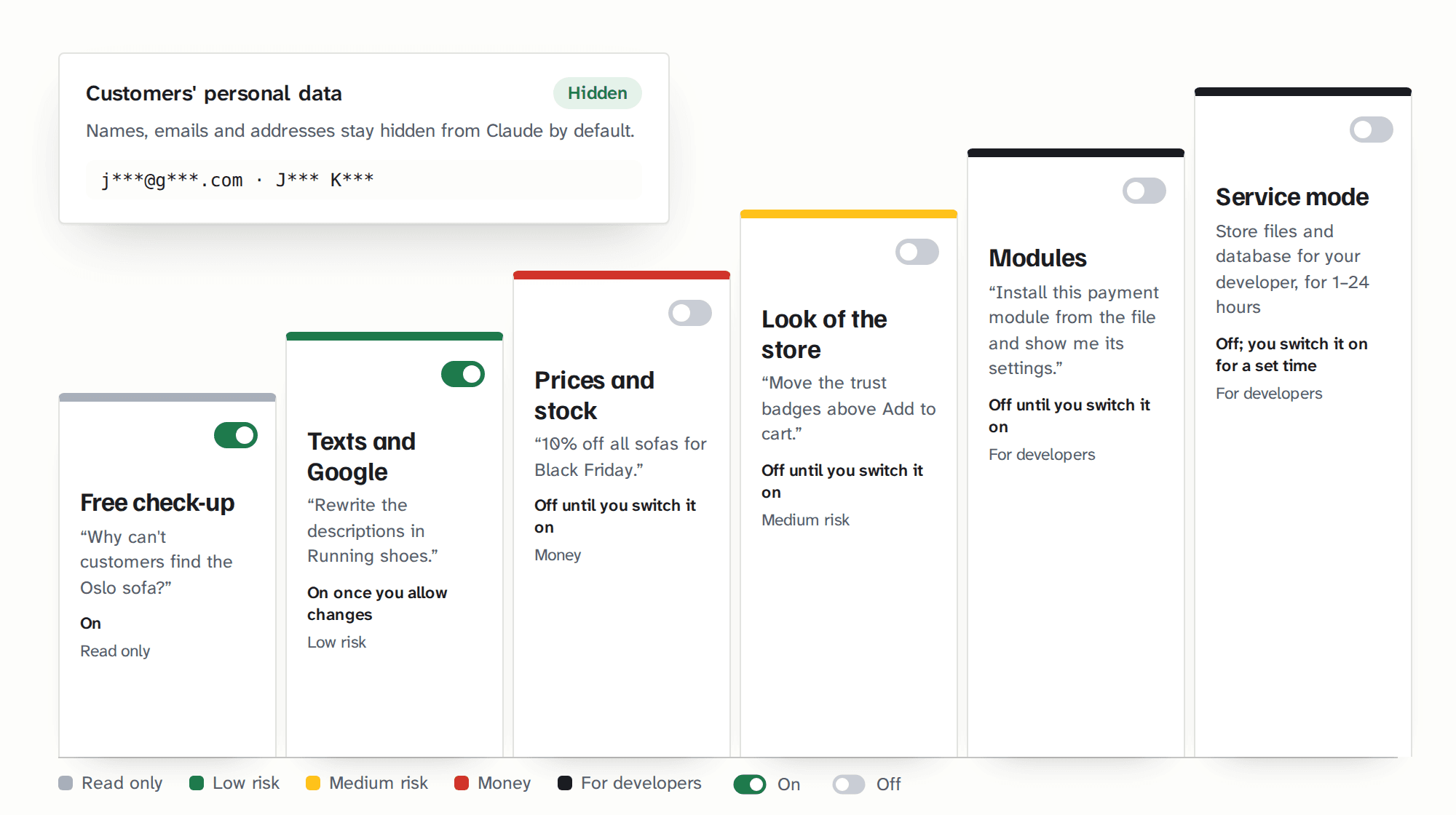
| Step | What Claude does for you | After install |
|---|---|---|
| Store check-up | Finds Google problems, missing pages, errors and products customers can't see | on, free |
| Texts and Google | Product, category and blog descriptions, Google titles and descriptions, image descriptions, Delivery and Returns pages, new products with photos, translations | on once you allow changes |
| Prices and stock | Prices, promotions, discount codes, variants, stock levels and free shipping over an amount, with warnings for big changes | off until you switch it on |
| Look of the store | Texts and layout in your theme, with a copy of every file, so changes survive updates | off until you switch it on |
| Modules | Switching modules on and off, their settings, installing and updating from a ZIP file | off until you switch it on |
| Service mode | Developer-level access: store files, the database, PrestaShop settings. On for 1 to 24 hours, then it switches itself off | off, switched on for a few hours |
Store check-up
After install: on, freeFinds Google problems, missing pages, errors and products customers can't see
Texts and Google
After install: on once you allow changesProduct, category and blog descriptions, Google titles and descriptions, image descriptions, Delivery and Returns pages, new products with photos, translations
Prices and stock
After install: off until you switch it onPrices, promotions, discount codes, variants, stock levels and free shipping over an amount, with warnings for big changes
Look of the store
After install: off until you switch it onTexts and layout in your theme, with a copy of every file, so changes survive updates
Modules
After install: off until you switch it onSwitching modules on and off, their settings, installing and updating from a ZIP file
Service mode
After install: off, switched on for a few hoursDeveloper-level access: store files, the database, PrestaShop settings. On for 1 to 24 hours, then it switches itself off
Make your first fix on the day you install it
- 01
Install the module.
In your PrestaShop back office, under Modules, like any other.
- 02
Enter your key.
Your store's address is registered automatically. Test copies of your store are free.
- 03
Add your store to Claude.
Copy the address from the module and paste it in Claude under Settings, in the Connectors section. Then just write what you need.
Requirements: PrestaShop 8.1 or newer (including 9), PHP 8.1 or newer and any Claude account, including the free one.
Nervous about touching your store? Included in the price is a "Safe first test": a 15-minute checklist for trying the module on a copy of your store before it touches the real one.
Step-by-step guide with screenshotsWhat about PrestaShop's own connection to Claude?
PrestaShop has a free, official connection focused on orders, customers and the catalog. It needs a PrestaShop Account and version 8.2 or newer. TellMyShop does the work around it: texts, Google, prices, the look of your store and finding problems, with a preview before every change and an undo after it. It needs no PrestaShop Account, works from version 8.1 and can run alongside the official one.
Pay once. The module is yours to keep.
Shop license: €199 excl. VAT for one store, paid once. About two to three hours of a developer's time.
The first 100 Shop licenses for €149 excl. VAT, with updates for life. Until the 100th license or 10 December 2026, whichever comes first.
People on the list get access 72 hours before everyone else.
Included in every paid license
- 70+ tools and the TellMyShop Consultant
- Preview, history and undo for every change
- 12 months of updates and email support
- Free test copies of your store
- Safe first test (15 minutes on a copy of your store)
Peace-of-mind guarantee.
Install it and try it on your own store. If within 7 days you decide it's not for you, we'll refund the full amount. One email is enough. Your store keeps running and the module goes back to the free TellMyShop Audit.
Questions and answers
All questionsDo I need to be technical?
No. If you can install a module in PrestaShop and copy an address into Claude's settings, you can set it up. After that you just write, the way you'd ask a colleague. Your developer will find the technical details in our documentation.
Which PrestaShop versions are supported?
PrestaShop 8.1 and newer, including 9, on PHP 8.1 or newer. If you're on 8.0, update to 8.1 first: it's a minor update within the same line. We're preparing a version for PrestaShop 1.7.8. Join the waiting list and we'll let you know when it's ready.
Do I need a paid Claude account?
No. Any Claude account will do, including a free one. A paid account lets you have longer and more frequent conversations. You pay Anthropic for Claude, separately from TellMyShop.
Will Claude change anything without asking me?
Claude always shows you the change first: the current text or price next to the new one. The module only saves a change that went through this preview, and Claude waits for your yes. If you want to be extra careful, set Claude to ask before every step, or keep the module in read-only mode. Looking around and checking your store change nothing, so Claude does those without asking.
What's the difference from PrestaShop's own connection to Claude?
PrestaShop offers a free official connection focused on orders, customers and the catalog. It needs a PrestaShop Account and PrestaShop 8.2 or newer. TellMyShop takes care of texts, Google, prices, the look of your store and finding problems, with a preview before every change and an undo after it. It needs no PrestaShop Account and runs on PrestaShop 8.1 and newer. You can use both.
What if it doesn't work with my store?
Try it on a test copy of your store first, for free. If it still doesn't work for you, ask for a refund within 7 days of purchase.
Give Claude one category and see how much time you get back each week
The English version launches in January 2027. Join the list and we'll tell you when it's ready, with 72 hours' head start on the launch offer.